
Count Messages and Photos in Your Chat
How many messages have you really exchanged with someone — or in that group? The answer almost always surprises.
With MonLivreSMS, import your chat (SMS, WhatsApp, Instagram, Messenger…) and get an instant message + photo count — free, before you even think about a book.
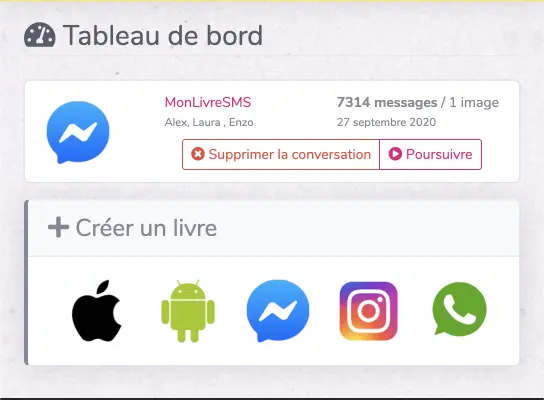
Steps for each chat type. After import, open My conversations on MonLivreSMS to see total messages + photos.

Count messages in an iPhone SMS chat
On iPhone, Apple locks direct SMS access: you need a computer, an unencrypted iPhone backup and MonLivreSMS to extract the chat.
After import, open My conversations for the message and photo count. Delete the import or start a book — your choice.

Count messages in an Android SMS chat
On Android, install MonLivreSMS from our website (not on Play Store — Google restricts SMS access).
Transfer the chat, then check My conversations for the message + photo total.

Count Instagram DM messages
Request your Instagram data export, download the archive, upload it to MonLivreSMS and pick the conversation.
The summary in My conversations shows messages and photos exchanged.

Count WhatsApp messages
Export the chat from WhatsApp, upload the file to MonLivreSMS. Step-by-step: download a WhatsApp chat.
In My conversations, message and photo totals appear right after analysis.

Count Messenger messages
Download your Facebook data (Messenger section), import the archive on MonLivreSMS and select the chat.
Then open My conversations for the full message and image count.
Frequently asked questions (FAQ)
Is the message counter free?
Yes. Import and summary display (messages + photos) in My conversations are free. Book or PDF creation is an optional next step.
Which platforms are supported?
iPhone SMS, Android SMS, WhatsApp, Instagram DMs and Facebook Messenger — via the appropriate export for each network.
Are photos and videos counted?
MonLivreSMS summary separates text messages and shared media (mainly photos) detected in your export.
Can I delete my chat after counting?
Yes. You can remove the import from My conversations anytime if you do not want to proceed to a book.
Print your texts like a publisher would
Screenshots, copy-paste into Word, dozens of unreadable pages… There is a better way: turn your SMS into a clean, paginated, lasting document.
MonLivreSMS extracts iPhone or Android messages, lays them out automatically, and delivers a certified PDF or a printed book made in France.
-
01
Export your conversation
WhatsApp, Messenger, Instagram, iPhone or Android SMS — in minutes from your phone.
-
02
Customize your book
Cover, bubble colors, highlighted photos — shape the story your way.
-
03
Receive your book at home
Quality printing, careful delivery. A keepsake that stays on the shelf.
From SMS to a book that matters
The simplest way to keep your messages
Your words, your dates, your shared photos. Everything that should not stay trapped in a digital pocket.
Start my SMS book